

Before finalising your payroll, it is important to review the Eziplan payroll export preview to identify any warnings or discrepancies related to broken shift allowances. This ensures that incorrect allowances are adjusted in Ezipay before finalising the payroll.
How the broken shift allowance looks like in Ezipay:
The Broken Shift Allowance earning lines can be found in the Other Earnings section within the Ezipay pay run.
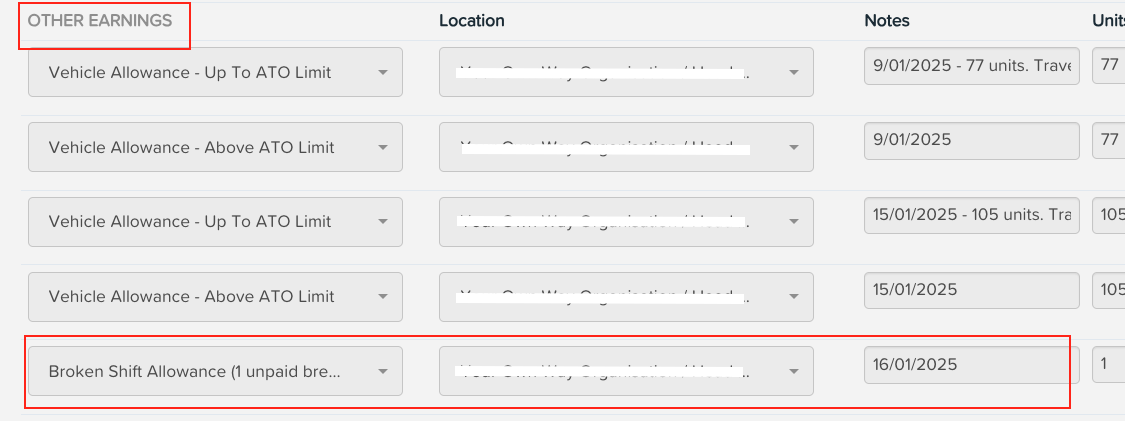
Managing Shift Breaks: What to Look For and How to Fix in Ezipay
Below are key scenarios where you need to verify whether the allowance has been applied or needs adjustment.
1. Broken Shift Allowance (1 unpaid break)
This applies when an employee works two or more distinct work periods within the same day, separated by one or two unpaid breaks that do not qualify as meal breaks.
Example Scenario:
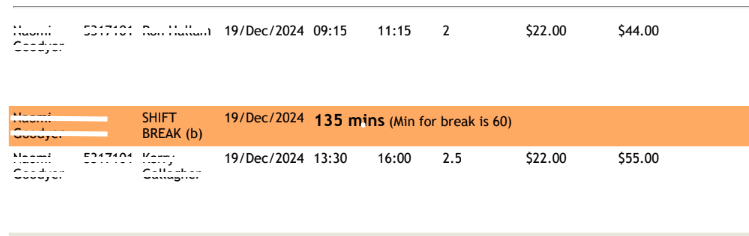
Shift 1: 09:15 – 11:15 (2 hours, active work)
Unpaid break: 11:15 – 13:30 (135 minutes unpaid)
Shift 2: 13:30 – 16:00 (2.5 hours, active work)
Eziplan payroll export preview:
2. Broken Shift Allowance (2 unpaid breaks)
A broken shift allowance may also be applied when an employee has two unpaid breaks within a single workday. However, it is important to review whether this is valid based on the SCHADS award conditions.
Example Scenario:
Shift 1: 12/12/2024, 09:45 – 10:30
Shift 2: 12/12/2024, 12:30 – 14:30 (120-minute unpaid gap from the first shift)
Shift 3: 12/12/2024, 16:15 – 16:45 (105-minute unpaid gap from the second shift)
Eziplan payroll export preview:
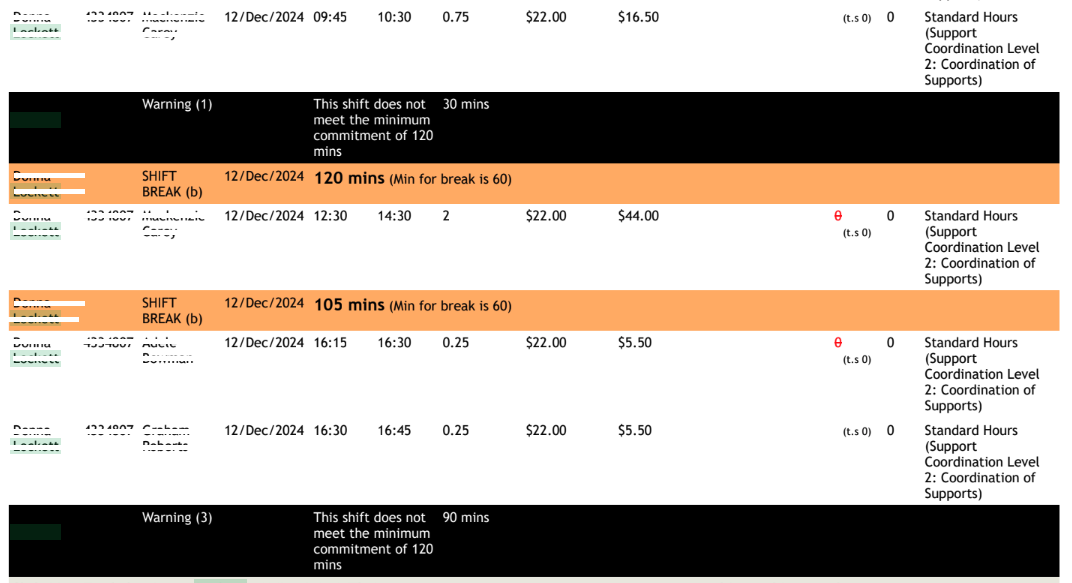
These two unpaid gaps meet the criteria for a broken shift allowance as there are two separate gaps between work periods.
How the 2 broken shift allowances should appear in Ezipay:

Note: A broken shift must have at least two separate work periods, and each work period should be a minimum of 2 hours for part-time and casual employees under the SCHADS Award. If any work period is shorter than 2 hours, the hours should be adjusted accordingly.
In some cases, 2 broken shift allowances may be applied in Ezipay when only one is valid. This happens when a meal break period is incorrectly counted as an unpaid gap.
Example scenario:
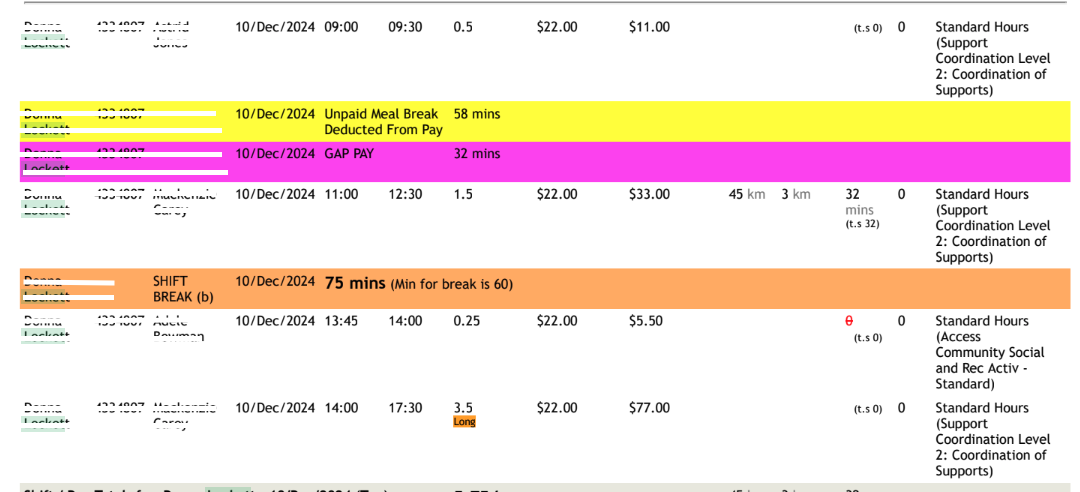
First shift: 09:00 – 09:30 (30 minutes)
Paid travel time: 09:30 – 10:02 (32 minutes, paid travel time)
Unpaid gap: 10:02 – 11:00 (58 minutes unpaid is meal break)
Second shift: 11:00 – 12:30 (90-minute unpaid gap from Shift 1 is BSA)
Third shift: 13:45 – 17:30 (75-minute unpaid gap from Shift 2
Since the first unpaid gap (58 minutes) is a meal break, a broken shift allowance should only be applied to the second unpaid gap (12:30–13:45) if it meets SCHADS Award conditions.
Eziplan payroll export preview:
How to fix in Ezipay:
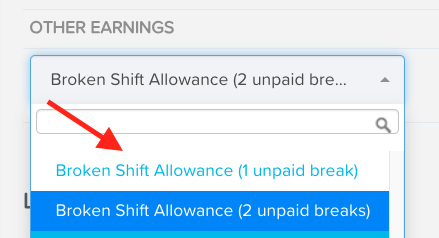
Click on the earning line and select Broken Shift Allowance (1 unpaid break).
Re-enter the number of units and notes.

Click on Save.
3. Meal Break only
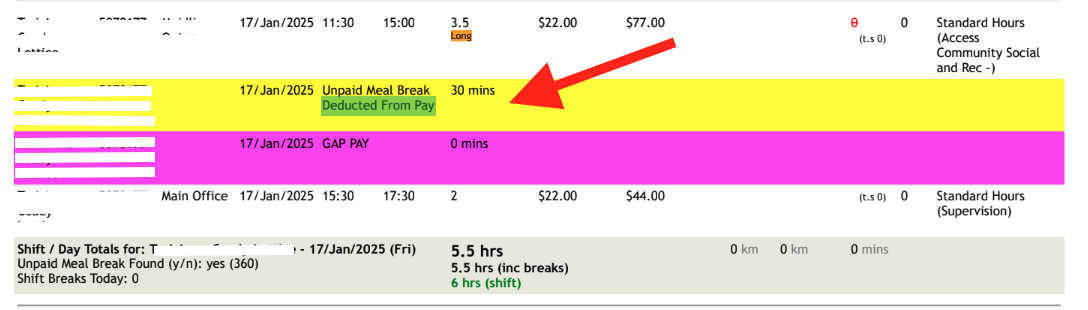
30–60 minute gaps between shifts will appear as Unpaid Meal Breaks in Eziplan. If a broken shift allowance appears for this short break, it is incorrect.
Eziplan payroll export preview:
How to fix in Ezipay:
Delete the invalid broken shift allowance by clicking on the 'x' icon at the rightmost side of the earning line.

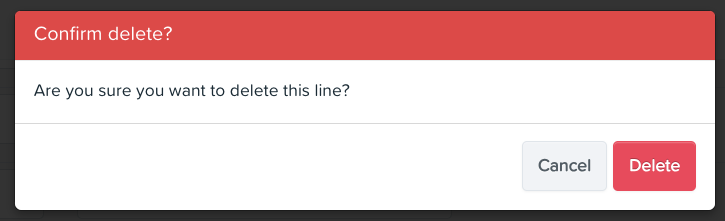
Click Delete to confirm.
3. Gap after sleepover
A broken shift allowance applies when an employee works two or more distinct work periods within the same day with more than a 30 minute break. Ezipay will count all breaks from 30 minutes to 10 hours as a broken shift allowance and after that consider them 2 separate shifts. In the example below, the 06:00 to 8:00 shift is a continuation of the sleepover shift from the previous day. However Ezipay will see no 10 hour break and so not understand it is a separate shift because they are too close together. Since the 16:00 to 22:00 shift is treated as an entirely new shift, a broken shift allowance should not be applied however you should review whether you should be paying your staff Overtime Rates for not giving them enough break.
Example Scenario:
Sleepover: 09/01/2025, 22:00 – 06:00 (passive sleepover)
Continuation shift: 06:00 – 8:00 (active work, continuation of sleepover shift)
Unpaid break: 8:00 – 16:00 (you are considering this a new separate shift as the previous one started the day before)
Next shift: 16:00 – 22:00 (considered a separate shift, not part of a broken shift)
Eziplan payroll export preview:
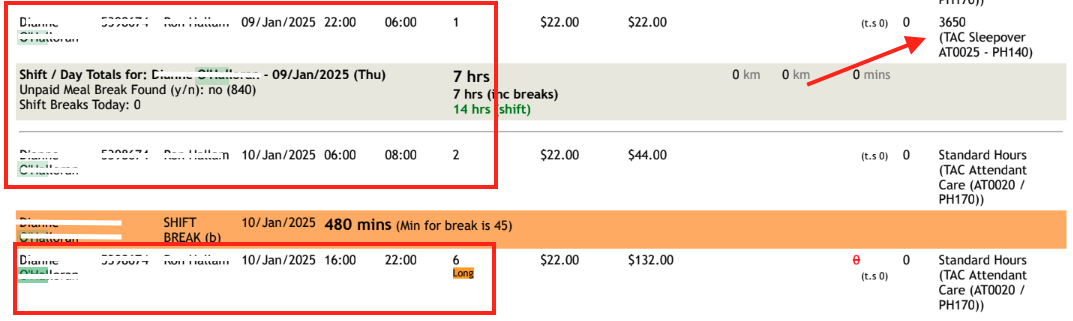
Notice also that the employee did not receive a full 10-hour break between the end of their work at 8:00 and the start of the next shift at 16:00. Therefore, the you may be required to pay overtime on the shift starting 16:00 (until a 10-hour break is completed).
To learn more about broken shift allowances, please refer to the Fair Work Ombudsman link.